

Where each thing is
EcomVision has two ways to look after a launch, and this update touches both:
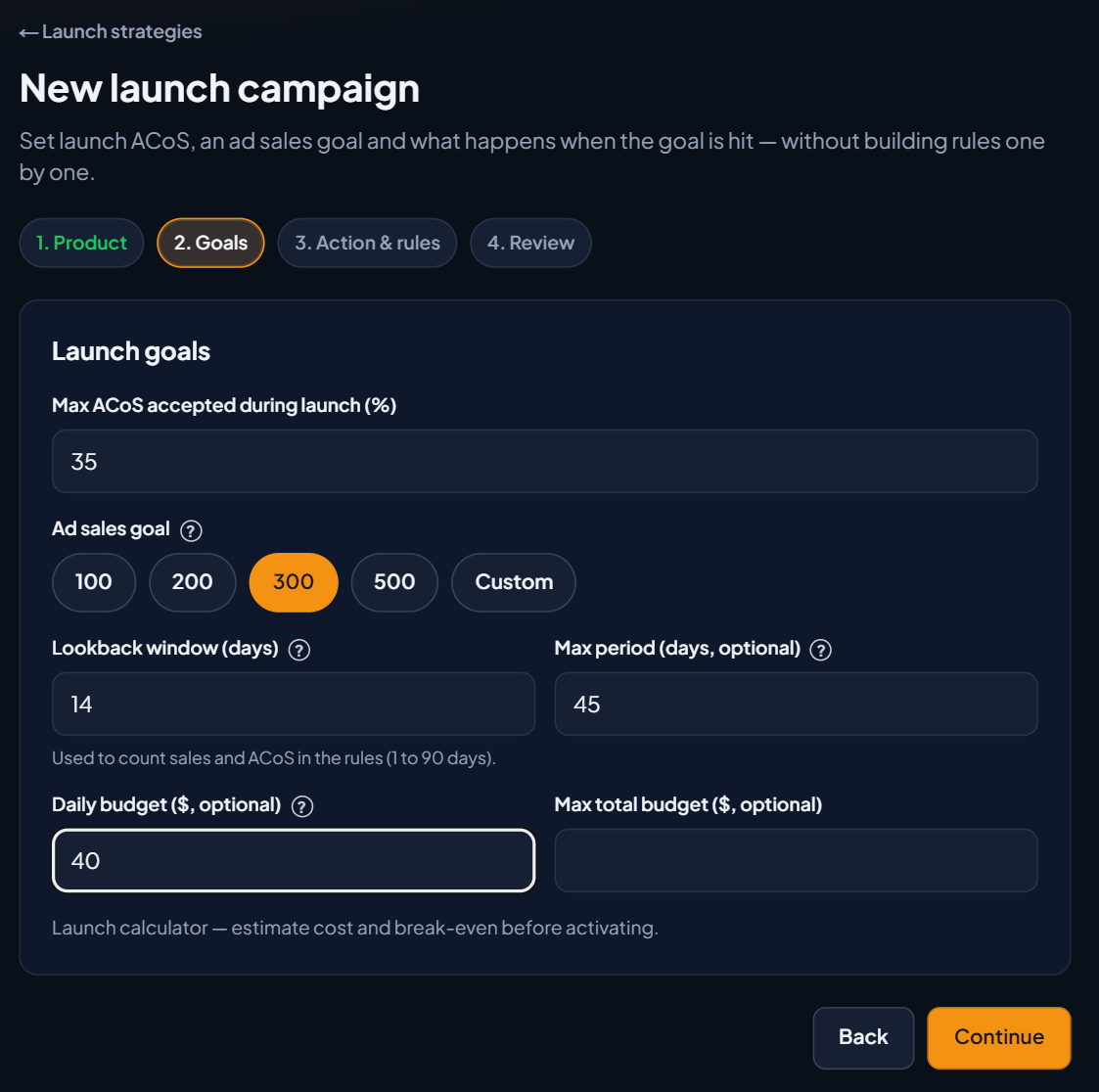
- Campaign automation › Launch campaign: creates a set of rules on campaigns you already have (it raises or lowers bids based on ACoS, cuts search terms with no sales, and acts when the goal is hit). This is where the Lookback window, Max period and Daily budget fields are.
- Launch strategies (through the Launch → link in Create SP campaign): the AI creates the campaigns on Amazon and tracks the goal on its own. This is where the new End strategy button is.
ACoS is ad spend divided by ad sales. An ACoS of 40% means US$40 in ads for every US$100 sold.
The 3 fields that now take effect
Lookback window (days)
How many days of data the rules look at to calculate sales and ACoS, from 1 to 90 (the default is 90). Before, the rules replaced the number you chose with an automatic window. Now they use exactly the days you chose. Example: 14 = the rules judge the launch by the last 14 days. A short window reacts faster, but fluctuates more. The rule that cuts search terms with no sales uses at least 30 days, so it has enough data before adding a negative.
Max period (days, optional)
How long the launch lasts. Example: 30 = 30 days from now, the strategy's rules turn themselves off. Each rule's card shows the date in Ends on. The system checks every 15 minutes. When the date arrives, the last run shows that the rule ended because the launch max period was over, and you get a notice in your notifications saying the launch strategy ended because its deadline was reached.
Important: the deadline turns off the rules, not the campaigns. They stay as they were on Amazon. To stop the spend, pause the campaigns in Campaigns.
Daily budget ($, optional)
A spending cap per day, adding up all the campaigns in the launch. Example: 100 = if the campaigns spend US$100 or more in a day, the rules stop raising bids and budgets (and don't turn campaigns on). The rule's result says the launch daily budget was reached, shows the spend and the cap, and says the increase was not applied. You also get a notice that the launch went over its daily budget.
- The calculation uses the last complete day with data (up to yesterday), because Amazon reports spend with a delay.
- The rules that lower bids keep working: the cap only holds back what would increase spend.
- Each campaign's budget on Amazon is not changed. It is a limit that the rules respect.
Step by step: create the launch with a deadline and a cap
- In Active account, at the top of the side menu, check the account.
- Open Main › Campaigns, click the small ▾ arrow and choose Campaign automation.
- Click the Launch campaign card and then New launch campaign.
- In 1. Product, fill in the Strategy name and the goal, and in Monitored campaigns, check the product's campaigns. Click Continue.
- In 2. Goals, fill in the Max ACoS accepted during launch (%) and the Ad sales goal. Then the three fields: Lookback window (days), Max period (days, optional) and Daily budget ($, optional). Click Continue.
- In 3. Action & rules, choose what to do when the goal is hit and the extra rules. Click Continue.
- In 4. Review, check the summary (it lists the three fields) and click Create launch strategy.
- The rules start in test mode: they only simulate and don't change anything on Amazon. Click Simulate on each one to see what it would do and, when you feel comfortable, Activate. The card shows Ends on and Daily budget when you filled in those fields.
Ending a strategy
In the Launch strategies list (the one with the campaigns created by the AI), each card now has an End strategy button. It shows up in the Active, Goal reached, Error — review, Paused and Draft states.
- Open Main › Campaigns › Create SP campaign, click Launch → and then the ← Launches link at the top.
- On the launch card, click End strategy (bottom right corner).
- Read the confirmation: the strategy's campaigns will be paused on Amazon and the goal will no longer be tracked.
- Click End and pause campaigns (or Cancel).
- A message confirms that the strategy ended and how many campaigns were paused on Amazon, and the card now shows Ended, with the date in Ended on.
Why pause the campaigns? Once the strategy ends, nothing watches the total budget, the deadline or the goal anymore. Pausing keeps the campaigns from spending on at the high launch ACoS, with no cap. Each pause is recorded in the Change log. To advertise again, re-enable the campaigns in Campaigns: it takes one click, and they are free to join a new launch strategy.
If some campaigns can't be paused, the message says how many were left out and asks you to pause them in Campaigns. If none of them pause, nothing changes and the strategy stays as it was.
What about the strategies I already had?
- Deadline and cap: strategies and rules created before this change have no Max period or Daily budget saved. They stay without a deadline and without a cap, as before.
- Lookback window: the launch rules you already created keep the automatic window, so no bid changes without you knowing. Want them to use the window you chose? Click Edit on the rule, open ▸ Advanced settings, switch Lookback window to Manual (I set it), enter the days and save.
- End strategy: works for any strategy in the list in the Active, Goal reached, Error — review, Paused and Draft states.
What this brings to your account
- A launch with a beginning, middle and end: the Max period makes sure the aggressive-phase rules don't keep running forgotten.
- Daily spend under control: the Daily budget holds back bid increases once the campaigns together have spent what you accept, without cutting the rules that save money.
- Decisions based on the data you chose: the Lookback window sets whether the rules react to the short term or look at the whole month.
- A safe way out: End strategy stops everything in one click, with a record of each paused campaign.
