

Why the step comes before the fix
The listing diagnosis through the connector already pointed out what's weak on the product page: a short title, few bullets, few images, a short description, no A+ content. But a list of problems doesn't tell you where to start.
If the product loses shoppers at the click, rewriting the description helps little: the shopper never opened the page. If it loses them at the purchase, the page may be fine, and what doesn't close is the offer. That's why the diagnosis now tells you the step first. The full explanation of each step is in Why my product gets impressions but no sales on Amazon. Here, the focus is asking for that reading in the AI you already use.
What the listing diagnosis now tells you
The diagnosis answer gained a funnel block. It uses Brand Analytics' Search Query Performance for the last 4 weeks and compares your product with the total of the same searches, step by step:
| Step | The index compares |
|---|---|
| Click | your clicks per impression with the clicks per impression of all sellers on the same searches |
| Cart | your cart adds per click with the search's |
| Purchase | your purchases per cart add with the search's |
Index 1.00 = same as the search. Below 0.80, the product loses shoppers at that step. It's the same cutoff that turns red on the app's Shopper Funnel screen. If more than one step is below 0.80, the losing step is the one with the lowest index.
Once the step is set, the listing findings that weigh on it move to the top of the list and are tagged with the step. The other findings stay in the answer, after them.
How to ask in Claude or ChatGPT
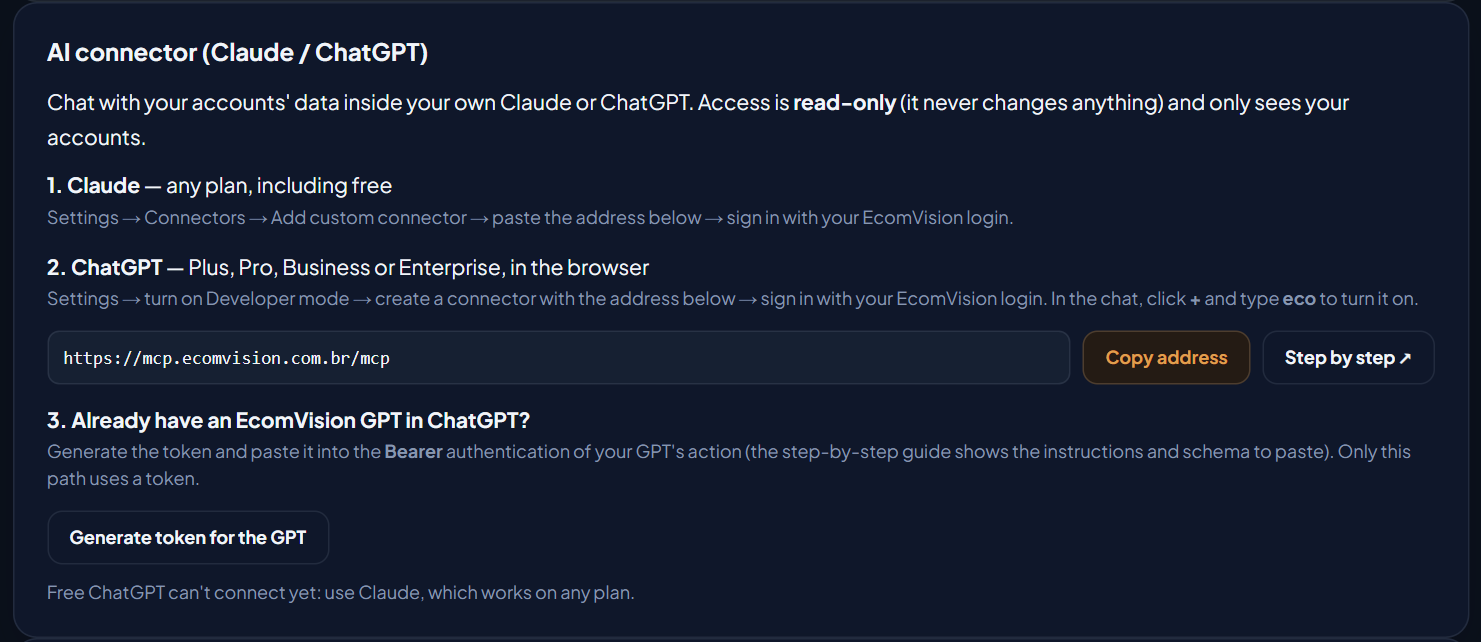
Before you start: the connector must be linked to your Claude (any plan, including free) or your ChatGPT (Plus, Pro, Business or Enterprise, in the browser), and the brand must be in Brand Registry, with Brand Analytics.
- In EcomVision, open System › Integrations. The first card is AI connector (Claude / ChatGPT). Click Copy address.
- In Claude: Settings → Connectors → + → Add custom connector. Paste the address, sign in with your EcomVision email and password and type the 6-digit code from your authenticator app.
In ChatGPT: in the browser, turn on Developer mode in Settings and create a connector with the same address. In the chat, click + and type eco to turn EcomVision on. The full step by step is on the AI connector page. - In a new chat, ask for the listing diagnosis, with the ASIN. For example:
- "Diagnose the listing for ASIN B0YGWCN90O. At which step does it lose the buyer?"
- "This product shows up in search and sells little. Where do shoppers give up and what do I fix first?"
- "Which of my products lose the most shoppers in the funnel? Diagnose the listing of the worst one."
If you have more than one account, the AI asks which one to work on. If you had already connected, there's no need to reconnect: the tool is the same, only the answer got more complete.
How to read the answer
The AI writes in its own words, but the numbers and the step come from EcomVision. The answer includes:
| In the answer | What it means |
|---|---|
| Click, cart and purchase indexes | 1.00 = same as the search. Below 0.80, the product loses shoppers at that step. |
| Losing step | click, cart or purchase. When every index is 0.80 or higher, there's no losing step. |
| Reading | A sentence that explains the step and says what comes first (see the table below). |
| Findings | What's weak in the listing. The ones that weigh on the losing step come first, tagged with the step. |
| Where to fix | The link to the product in the Listing optimizer. The connector doesn't write the new title or bullets: the copy is written in the AI Builder, which asks for your confirmation before publishing. |
What comes first at each step
The reading in the answer follows these sentences (EcomVision's text, which the AI summarizes):
| Losing step | What the answer says | What comes first |
|---|---|---|
| Click | "it shows up in search but gets fewer clicks than competitors" | Title and main image, which is what the shopper sees in search. |
| Cart | "people open the page and are not convinced" | Bullets, images, A+ content and description: the page has to answer the question of whoever arrived. |
| Purchase | "the page convinces, but the offer does not close" | The offer, not the copy. The first finding becomes the offer: Buy Box, shipping and delivery time. |
| None | "the listing keeps up with the search on click, cart and purchase" | The findings on the list are refinements, not the cause of lost sales. |
- Loses at the click: check that the title puts what matters first and that the main image follows Amazon's image rules. That's what shows up in search, before anything else.
- Loses at the cart: the page didn't answer the question of whoever clicked. See which shopper questions the listing leaves unanswered with the Rufus checklist in Re-score and fix it in the AI Builder.
- Loses at the purchase: before touching the copy, check whether your offer has the Buy Box and how shipping and delivery time look, for example whether the product has stock in FBA. What you can measure about the cart is in Amazon cart abandonment.
Example: the frying pan in the demo account
In EcomVision's US demo account (fictitious products and brand), the 11-inch ceramic frying pan shows up like this on the Shopper Funnel screen, for the last 4 weeks:
| Step | Frying pan | All sellers on the same searches | Index |
|---|---|---|---|
| Click (clicks per impression) | 11.2% | 8.8% | 1.27 |
| Cart (cart adds per click) | 37.5% | 43.8% | 0.86 |
| Purchase (purchases per cart add) | 48.2% | 63% | 0.77 |
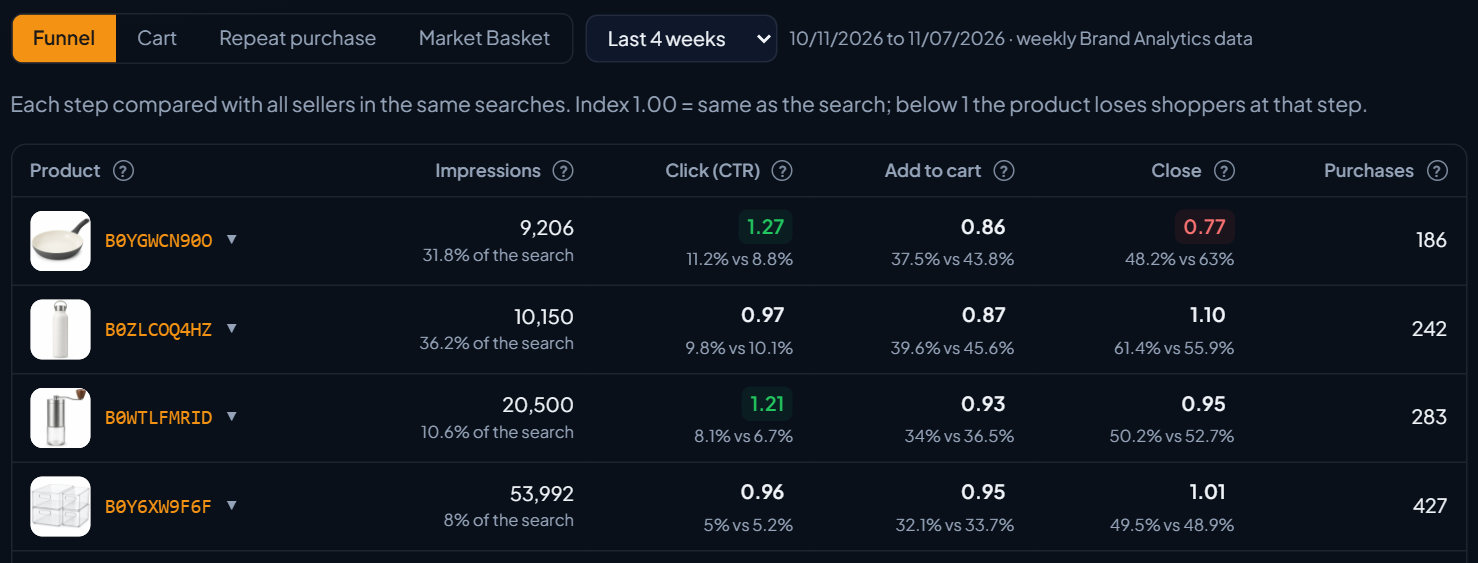
The product gets more clicks than the search average and adds to cart close to the average. Only the purchase is below 0.80. When you ask the connector to diagnose this ASIN, the answer comes in this format:
You: Diagnose the listing for ASIN B0YGWCN90O. At which step does it lose the buyer?
Funnel, last 4 weeks: click 1.27 · cart 0.86 · purchase 0.77
Losing step: purchase. "the listing loses shoppers between CART and PURCHASE: the page convinces, but the offer does not close. Check price, Buy Box, shipping and delivery time"
1st finding (step: purchase), offer: "purchases per cart below the search — price, Buy Box, shipping or delivery time lose to competitors (not the page copy)"
Then: the other listing findings, without the step tag, and the link to the product in the Listing optimizer.
In this case, rewriting bullets and description isn't the first step. The way forward is to check the frying pan's offer (Buy Box, shipping and delivery time) and only then the page refinements. The AI sums it all up in its own words, and the text changes from one chat to another; the indexes and the step are always EcomVision's.
When the answer doesn't tell the step
Sometimes there's no way to compare with the search. The answer says why, and the rest of the diagnosis still holds, with the findings in the usual order:
| Situation | What the answer says |
|---|---|
| Brand not in Brand Registry | "the Shopper Funnel needs Brand Registry (Brand Analytics) — without it we cannot tell at which step the listing loses shoppers" |
| No data for the product in the last 4 weeks | "no Shopper Funnel data (Search Query Performance) for this ASIN in the period" |
| Fewer than 20 clicks in the period | It says how many clicks the product had and that the minimum is 20: with little volume, the comparison with the search isn't reliable. |
Without Brand Registry, Seller Central's Business Reports still show sessions and unit session percentage. They don't show the search step, but they already tell you whether the problem comes after the click.
