

Why cash gets tight even when sales are good
The month's profit can be positive and you can still run short of cash in a given week. The reason is the calendar: each amount comes in or goes out on a different day.
- Amazon groups sales into a cycle and only pays out after the cycle closes.
- Ads are charged every day, to your card, on most accounts.
- Inventory has to be ordered before it runs out, and the supplier charges on the agreed date.
- Taxes fall due on their own date.
Looking only at the month's profit, you don't see the week when outflows arrive before the payout. The Cash forecast shows exactly that week.
Where it is and how to open it
- At the top of the left sidebar, choose the account in the account selector. Then open Finance › Reconciliation.
- Below the summary, click the Cash forecast tab, the last one after Orders, Payouts, Bank and By product.
- The forecast shows up right away, built from the data EcomVision already has for the account. It only reads: it changes nothing on Amazon or in your bank.
The tab shows up on Amazon seller accounts connected to EcomVision. You can also ask Vision, the in-app assistant, something like "will I run short of cash in the next 60 days?": it uses the same math as the tab.
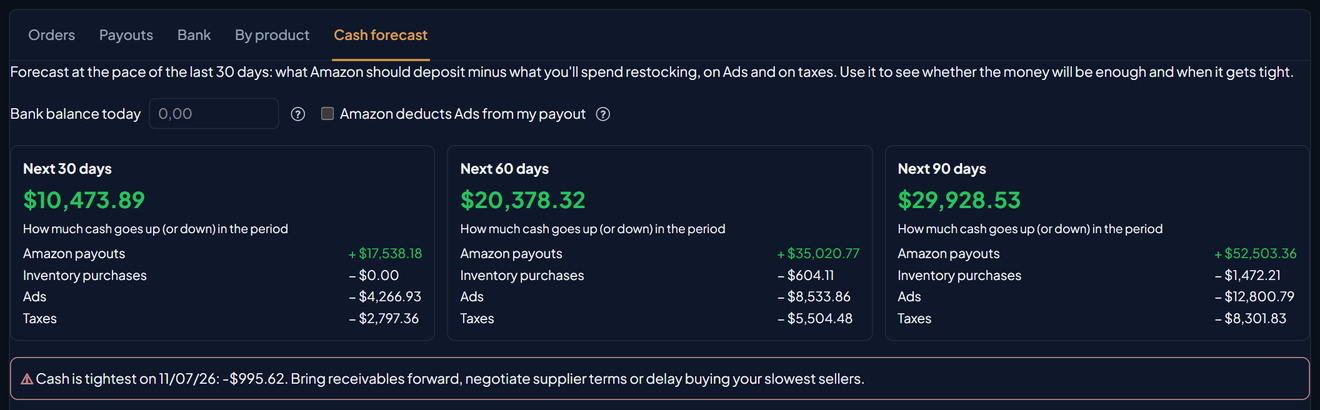
The 30, 60 and 90-day boxes
At the top there are three boxes: Next 30 days, Next 60 days and Next 90 days. The big number tells you how much cash goes up (or down) in the period: green when it goes up, red when it goes down. Below it are the four lines of the math:
| Line | What goes into it |
|---|---|
| Amazon payouts | What Amazon should deposit in the period: the open cycle, closed cycles that haven't landed yet and the next cycles. |
| Inventory purchases | What you'll pay the supplier so stock doesn't run out at the current sales pace, on the payment date. |
| Ads | Ad spend, at the daily average of the last 30 days. |
| Taxes | Tax on sales, at the rate set in Costs, paid on the 20th of the following month. |
About taxes in the US. The Taxes line uses the rate you set in Costs and pays it on the 20th of the following month, the schedule of Brazil's monthly tax. In the US, Amazon collects and remits sales tax on most marketplace orders. If you don't pay a percentage of sales yourself, leave the tax rate at zero in Costs and the line stays at zero. If you do, set the rate you actually pay and keep in mind that the due date may differ from yours.
Is Ads deducted from your payout instead of charged to your card? Check Amazon deducts Ads from my payout. Ads then leaves the outflows, because it's already inside the average payout. Without the check, it would be counted twice.
Your bank balance and the tightest point
Without the balance, the boxes show only how cash changes. In Bank balance today, type how much you have in the bank today. The field is optional. With it, each box shows the Expected bank balance at the end of the period, and the Running total column in the weekly table adds the balance too. The value stays only in the browser where you typed it and isn't sent to EcomVision.
When the money doesn't cover some week, a warning shows above the table, "Cash is tightest on", with the date and the amount at the lowest point. The warning itself suggests what to do: bring receivables forward, negotiate supplier terms or delay buying your slowest sellers. With a balance typed in, the warning only shows if not even the balance covers that week.
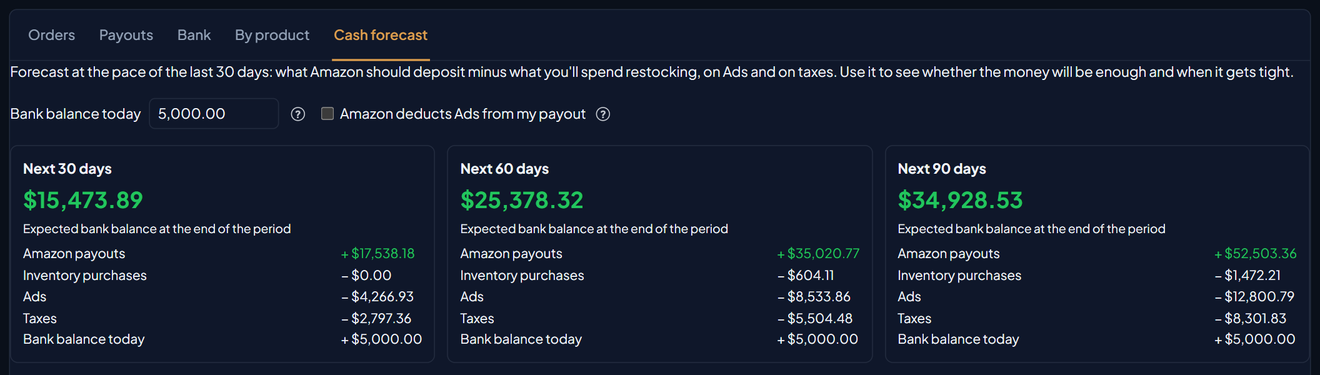
Week by week
Below the boxes, the Week by week table shows the next 90 days in 7-day blocks, starting today:
| Column | What it shows |
|---|---|
| Week | The 7-day period. |
| Week balance | Payouts minus purchases, Ads and taxes for that week. |
| Running total | The sum of the weeks so far, plus your bank balance if you typed it. In red, the money doesn't cover that date. |
| Amazon payouts, Inventory purchases, Ads, Taxes | Each part of the week. The dash (—) means nothing falls in it. |
A week with a negative balance is normal: it's a week with no payout. What matters is the Running total. If it turns red, that's where the money runs short. You can drag the columns to change their order.
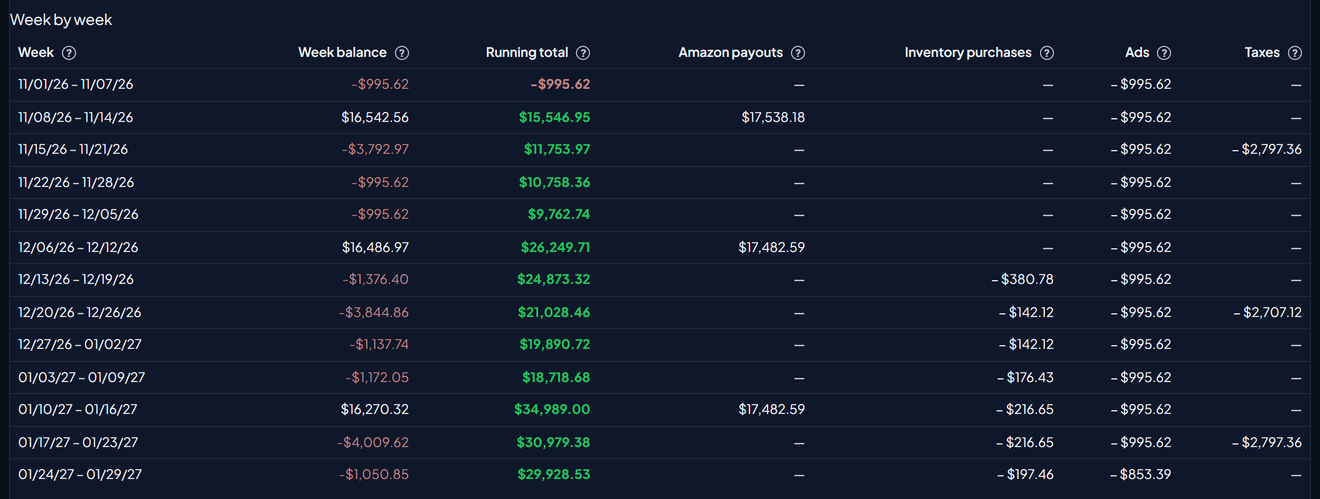
Expected inventory purchases (90 days)
This table lists the products that need restocking in the next 90 days so stock doesn't run out at the current pace:
| Column | What it shows |
|---|---|
| Product | The product, with the main supplier when one is set. |
| 1st order | The date restocking must start so stock doesn't run out: stock (available and inbound) divided by daily sales, minus the lead time. |
| Units | How many units to buy in the 90 days. |
| Due in 90 days | Units × the cost you set, only what falls due in the next 90 days. |
| Lead time | Days between ordering from the supplier and having the stock available at Amazon. |
| Payment terms | The main supplier's terms. With no terms, it shows "upfront": the payment falls on the order date. |
A purchase enters the forecast on the payment date, not the order date. That's why a product can need an order today and weigh nothing on the next 30 days of cash: with 45-day terms, the money only leaves in 45 days.
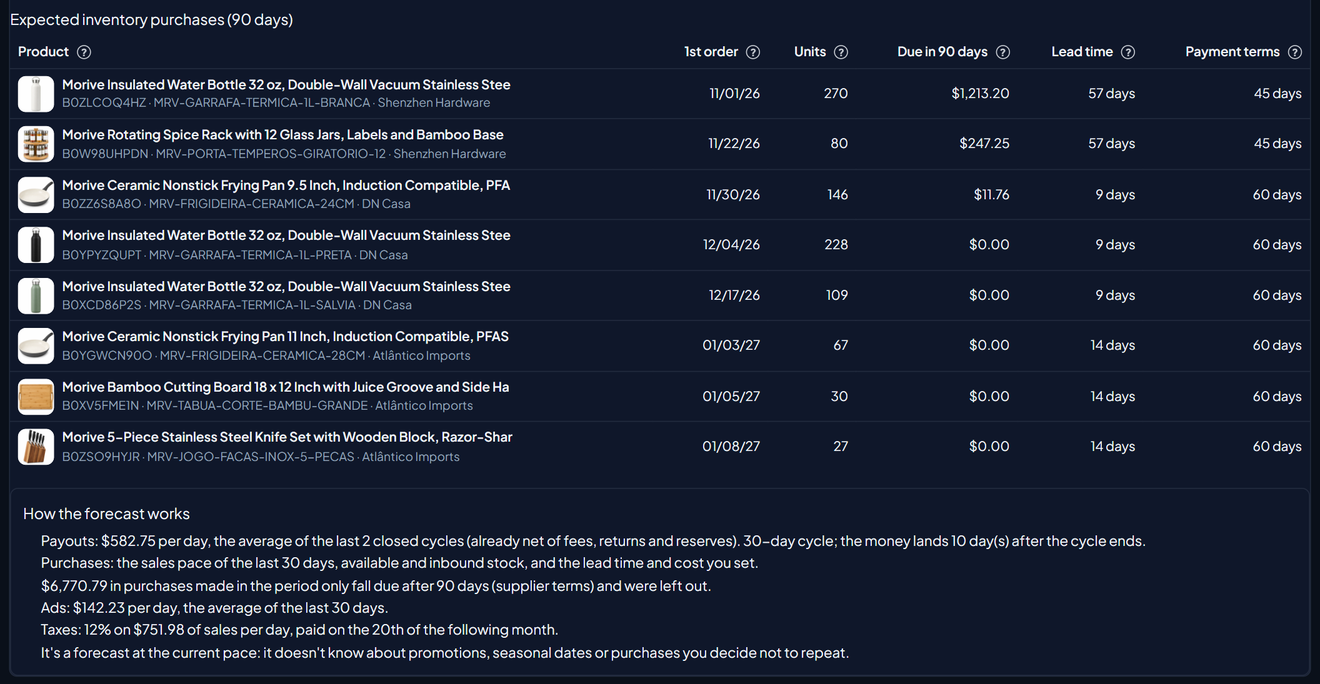
Where each number comes from
At the end of the tab, the How the forecast works box shows the numbers used for your account. The rule for each line:
- Payouts: the daily average of the closed payout cycles of the last 90 days, already net of fees, returns and reserves. The cycle length and how many days the money takes to land also come from your account's cycles. The open cycle comes in with what it has already accumulated plus the average pace until it ends.
- Purchases: the sales pace of the last 30 days, the stock available in FBA, your own stock and what's inbound, and the lead time and cost you set. Payment follows the main supplier's terms.
- Ads: the daily average of the last 30 days.
- Taxes: the tax rate set in Costs on average daily sales, paid on the 20th of the following month.
When some data is missing, a warning shows above the weekly table, with the Set it in Costs link when it applies:
- No closed payout cycles: payouts are estimated from sales minus fees over the last 30 days, in 14-day cycles. Click ↻ Sync at the top of the screen to use the real payouts.
- Product without cost: left out of purchases.
- Product without lead time: the math uses lead time 0, so the purchase may come earlier than forecast.
- Product with no inventory reading: left out of purchases until Amazon reports the stock.
- Account with no tax rate set: taxes stay at zero.
It's a forecast at the current pace. It doesn't know about promotions, seasonal dates or purchases you decide not to repeat. Before a big date like Black Friday, expect more sales and more inventory purchases than the forecast shows (see How to plan FBA inventory for Black Friday).
Example: the demo account
On EcomVision's US demo account (fictitious products and numbers), the forecast on November 1, 2026 looked like this:
| Period | Payouts | Purchases | Ads | Taxes | Cash goes up |
|---|---|---|---|---|---|
| Next 30 days | + $17,538.18 | − $0.00 | − $4,266.93 | − $2,797.36 | $10,473.89 |
| Next 60 days | + $35,020.77 | − $604.11 | − $8,533.86 | − $5,504.48 | $20,378.32 |
| Next 90 days | + $52,503.36 | − $1,472.21 | − $12,800.79 | − $8,301.83 | $29,928.53 |
All three periods end positive. Even so, the first week, from 11/01 to 11/07, sits at −$995.62: 7 days of Ads, at $142.23 a day, before the next payout lands the following week. That's the "Cash is tightest on 11/07/26" warning. With $5,000.00 typed in Bank balance today, the warning goes away and the 30-day box shows $15,473.89 expected in the bank.
Purchases for the next 30 days stay at $0.00, even though one product needs an order on 11/01. Its supplier charges in 45 days, so the payment falls later. And $6,770.79 in purchases made in the period only fall due after 90 days: the How the forecast works box notes that this amount was left out.
What to do when the cash doesn't cover it
- Type the bank balance. Without it, the warning only looks at how cash changes, as if you started from zero.
- Clear the warnings. Missing cost, lead time and tax rate change the result. Set cost and lead time in Costs and the supplier's payment terms in Suppliers.
- Find the red week in the Running total column.
- See what falls due in it. In the purchases table, the 1st order date plus the payment terms shows which purchase weighs on that week. Negotiating terms with the supplier or splitting the order pushes the payment past the payout.
- Open the tab again after changing any setting. The forecast is rebuilt every time you open it.
To understand each payout Amazon makes, see How to reconcile Amazon payouts. To know when each product will run out, see How to predict stockouts.
