

What changed
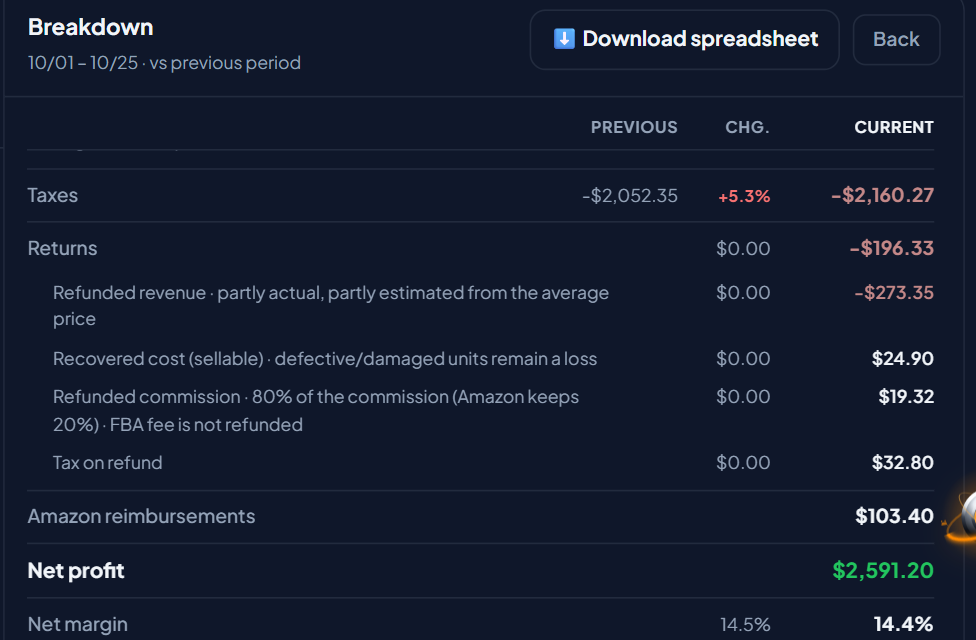
- Amazon reimbursements in profit: the cash Amazon pays for inventory lost or damaged while in its custody is added as positive revenue, on the reimbursement date.
- Returns list in the card: the Returns card detail shows every return, not just the total.
- Corrected calculation: when the sale and the refund to the buyer fall in the same Amazon payment cycle, the refunded amount is now calculated from the product's average price. Before, it showed lower than it really was.
Which reimbursements count in profit
| Reimbursement reason | Counts in profit? |
|---|---|
| Product damaged or lost in an Amazon warehouse | Yes, added |
| Product lost or damaged at FBA inbound or outbound | Yes, added |
| Product damaged by the carrier | Yes, added |
| Reversal of one of these reimbursements (Amazon found the product) | Yes, deducted |
| Customer-related reimbursement (refund without the product coming back, customer service) | No |
Customer-related reimbursements are left out on purpose. In those cases the refund to the buyer is not deducted from profit either, so adding the reimbursement would make profit look higher than it is. Reimbursements paid in inventory (Amazon returns the unit to stock) are not added, because they are not cash.
Where to see reimbursements
In the Dashboard, under Results, click + details on the period you want. In the Breakdown, the Amazon reimbursements line shows right above Net profit, after returns.
The returns list
The Returns card is turned on in Customize, above the Dashboard cards. Click the card's i to open the detail. Besides the profit impact and returned units, it shows the period's Amazon reimbursements and the Returns in the period section, with one line per return:
- the date the product was returned;
- the product and how many units came back;
- the condition the unit came back in: sellable, damaged by customer, damaged in transit, defective;
- the amount refunded to the buyer and whether it is actual or estimated.
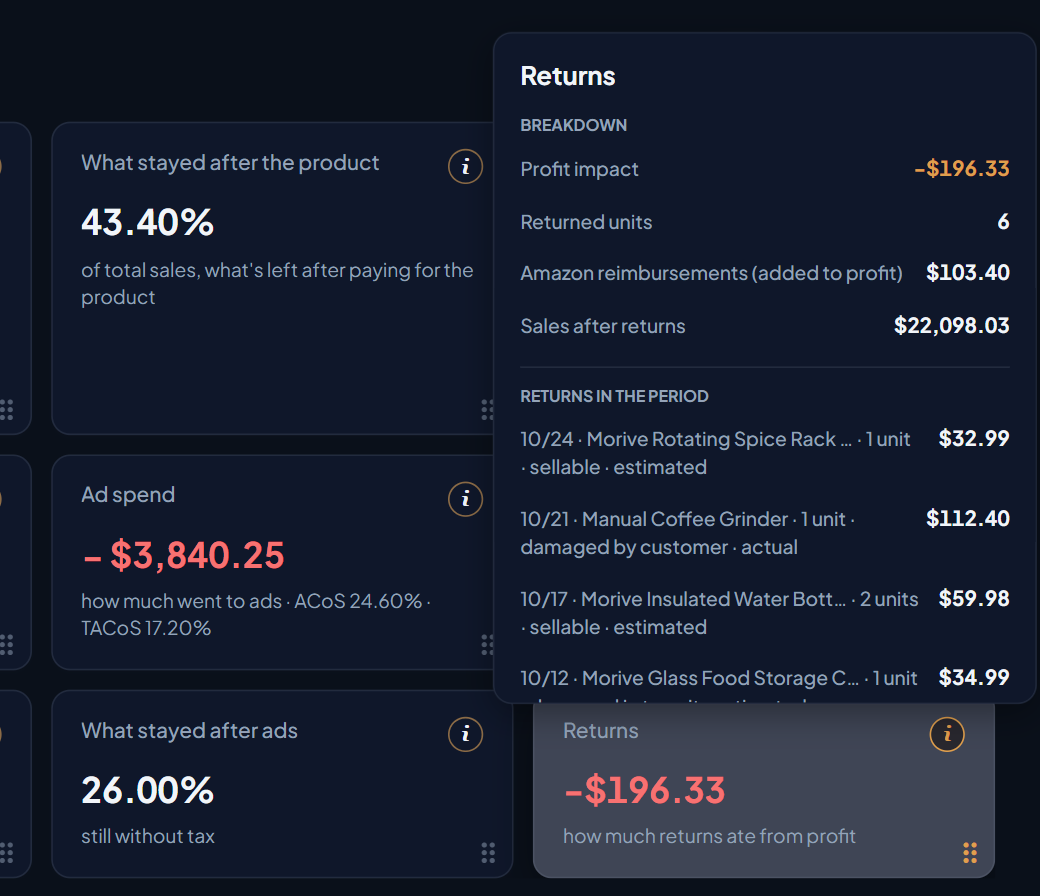
The list shows the 50 most recent returns. The card total adds up all of them.
Why some amounts are estimated
The amount is actual when Amazon records the refund separately from the sale. That happens when the account has the Finance permission and the refund falls in a different payment cycle from the sale.
When the sale and the refund fall in the same cycle, Amazon merges them into a single record and the refund amount is not shown separately. In that case EcomVision uses the product's average price over the previous 90 days, and the list marks the line as estimated. The same applies to accounts without the Finance permission.
Action plan
- Open the list: in the Returns card, see which returns weighed the most in the period.
- Find the product: the same product coming back several times, or coming back damaged, calls for a look at the listing and the packaging.
- Check reimbursements: in the Breakdown, see how much Amazon has already paid for losses and damage.
- Request reimbursement: what was lost or damaged and not paid yet can be requested from Amazon. See how in Spreadsheet for Amazon support.
