

Why look at ACoS product by product
A single ACoS target for the whole account treats products with different margins the same way. A product that keeps 35% of the sale before ads can handle an ACoS that would lose money on a product that keeps 15%.
The number that separates profit from loss on ads is the break-even ACoS: the share of the sale left after Amazon fees, tax and product cost. The math, and how it differs from a target ACoS, is in How to calculate your target ACoS. Here the focus is where to see that number for each product, already calculated from the period's sales and costs, and what to do with it.
Where the two columns are
- In the sidebar, open Main › Dashboard.
- At the top, pick the period: Today, 7 days, 30 days and others. To decide on ads, prefer 30 days: in a single day, a few sales change the math a lot.
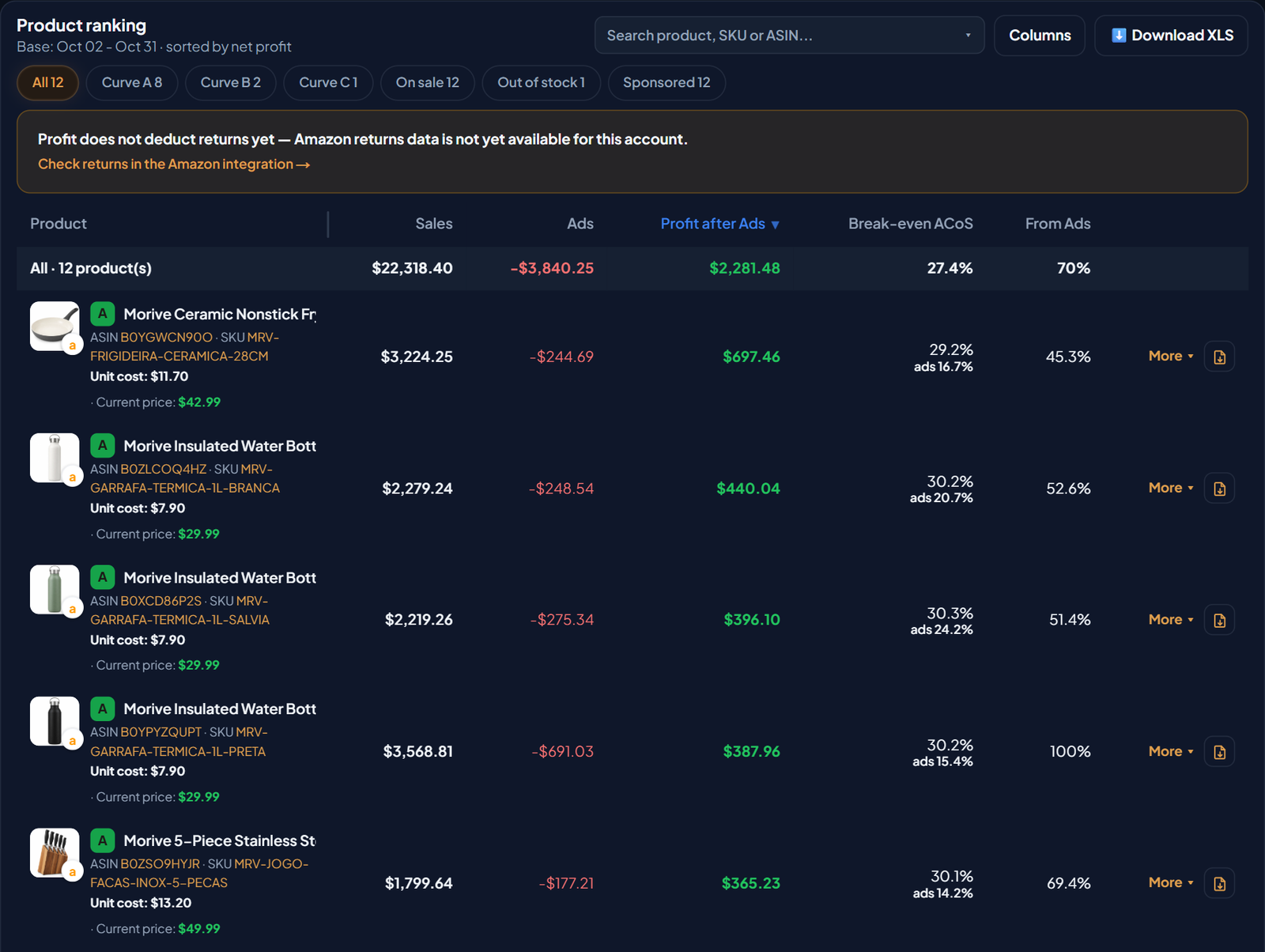
- Scroll down to Product ranking. The Break-even ACoS and From Ads columns show by default, after Margin after Ads and ROI.
- If they don't show, click Columns and check Break-even ACoS and Sales from Ads (%). Restore default goes back to the original.
- Click a column name to sort the list by it. The first row, All, shows both numbers for the products in the chosen filter (Curve A, On sale, Sponsored and the others).
The columns only read data. Nothing changes in your ads or on Amazon.
Break-even ACoS: how to read it
Profit before Ads is what's left from sales after Amazon fees, tax and product cost. In the product detail it shows as Gross profit.
Under the number comes the product's ad ACoS for the period, for example ads 16.7%: ad spend divided by the sales the ads brought. Comparing the two sets the color:
| In the column | What it means |
|---|---|
| Number in red | The ad ACoS went above break-even. Every ad sale loses money. |
| Number in the normal color, with "ads X%" under it | The ad ACoS is below break-even. The ads are profitable. |
| Number with no "ads" under it | The product had no ads in the period. The tooltip says how high ACoS can go without losing money. |
| ≈ before the number | The product has no registered cost. The number is approximate, estimated from the account COGS. |
| — | It can't be calculated without the cost. Click Register cost in the Product column. |
| Negative number | The product already loses money before ads. No ACoS makes the ads profitable. |
Hover over the number to read the explanation. On the demo account's 11-inch frying pan: "Ad ACoS 16.7%, below break-even 29.2%: the ads are profitable." When it's red, the tooltip says: "every ad sale loses money. Lower bids or negate the terms that do not sell."

Don't confuse it with the Real ACoS in the product detail. Real ACoS divides ad spend by all of the product's sales, with and without ads, much like TACoS. The break-even color uses the ad ACoS, which divides only by the sales the ads brought.
From Ads: how much the product depends on ads
Close to 100%, almost everything the product sells comes from ads: pause them and sales drop too. Close to 0%, the product sells on its own, through organic search, and ads weigh little. Hover over the number to see ad sales and organic sales in dollars.
The number goes up to 100%. Amazon credits the ad with sales made up to 7 days after the click, so ad sales can exceed the period's sales. When that happens the column shows 100%.
Read From Ads and break-even ACoS together. With high From Ads and ads below break-even, the product depends on ads, but they are profitable. With high From Ads and ads above break-even, the product sells almost only through ads and loses money on each of those sales: look at it first. For the weight of ads across the whole account, see TACoS and organic sales by product and campaign.
The product detail (More ▾)
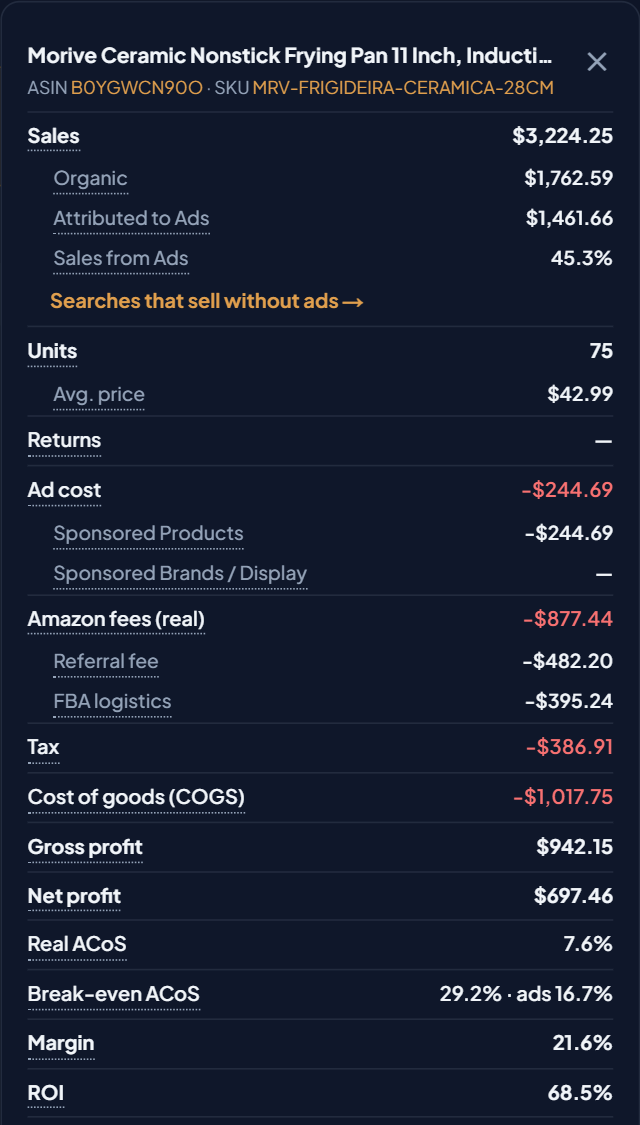
On the product row, click More ▾. The detail opens with the same two numbers and the full profit math:
- Under Sales: Organic, Attributed to Ads and Sales from Ads.
- Right below, on a product with ads, the Searches that sell without ads → shortcut, which shows the searches where the product already ranks without ads. See Searches that sell without ads.
- Further down: Ad cost, Amazon fees, Tax, Cost of goods (COGS), Gross profit, Net profit, Real ACoS and Break-even ACoS, with the ad ACoS next to it, in red when it goes above break-even.
Example: three products on the demo account
On the EcomVision demo account (fictional products and brand), over the 30 days from Oct 2 to Oct 31:
| Product | Sales | Profit before Ads | Break-even ACoS | Ad ACoS | From Ads |
|---|---|---|---|---|---|
| Ceramic frying pan, 11 inch | $3,224.25 | $942.15 | 29.2% | 16.7% | 45.3% |
| Water bottle 32 oz, black | $3,568.81 | $1,078.99 | 30.2% | 15.4% | 100% |
| Dish drying rack | $1,359.66 | −$124.11 | −9.1% | 137.1% | 61.8% |
11-inch frying pan. The ad ACoS (16.7%) is well below break-even (29.2%). On ad sales of $1,461.66, about 29.2%, or $427, is left before ads, and the ads cost $244.69: the ads leave about $180 of profit. If its ad ACoS went above 29.2%, the cell would turn red and every ad sale would start losing money.
Black water bottle. The ads are well below break-even (15.4% vs 30.2%) and profitable. But From Ads is at 100%: sales depend on ads. Before cutting budget, check whether it already ranks without ads on the searches that sell.
Dish drying rack. Break-even is negative: the product already loses money before ads, with fees, tax and cost. No bid fixes that, and every ad sale adds to the loss.
What to do in each case
| Situation | What to do |
|---|---|
| Red: ads above break-even | Lower the bids on the product's keywords and negate the terms that spend without selling. The Leak hunter shows those terms in bulk, and the max profitable bid shows how high each bid can go. |
| Below break-even, with high From Ads | The ads are profitable. Don't pause without testing: sales depend on them. Open Searches that sell without ads to find the searches where you can lower the bid gradually. |
| Below break-even, with low From Ads | The product sells on its own and the ads are profitable. Keep an eye on it in the ranking. |
| Negative break-even | The problem is before the ads. Check that the registered cost and the fees in the More detail are right. If they are, every ad sale adds to the loss: review this product's bids. |
| ≈ or — | Click Register cost in the Product column. The row's profit and break-even recalculate right away. |
Break-even is the limit, not the target. At break-even, the ad only breaks even. To keep a profit on each sale, the target ACoS sits below it. See the math in How to calculate your target ACoS.
