

Why compare the ad with the position without ads
The ads report says how much each search sold through the ad. It doesn't say whether the product would sell there without the ad. To know, you have to look at Amazon's search page: where the product shows up when ads aren't counted.
If it's near the top, the ad competes for the click with your own organic result, and lowering the bid gradually may keep much of the sales while spending less. If it's at the end of page 1 or off it, the ad is what brings that search's sales, and the suggestion is to keep the bid.
None of this is guaranteed: each search reacts differently. That's why the suggestion is always to test gradually and watch the sales.
Where it is and how to open it
- In the sidebar, open Main › Dashboard and scroll down to Product ranking.
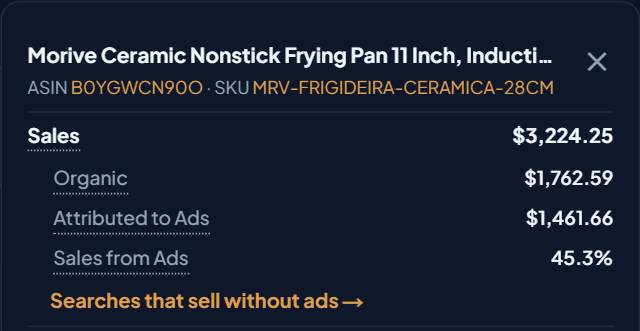
- On the product row, click More ▾.
- In the product detail, right below Sales from Ads, click Searches that sell without ads →. The shortcut only shows on a product that had ad sales or ad spend in the period.
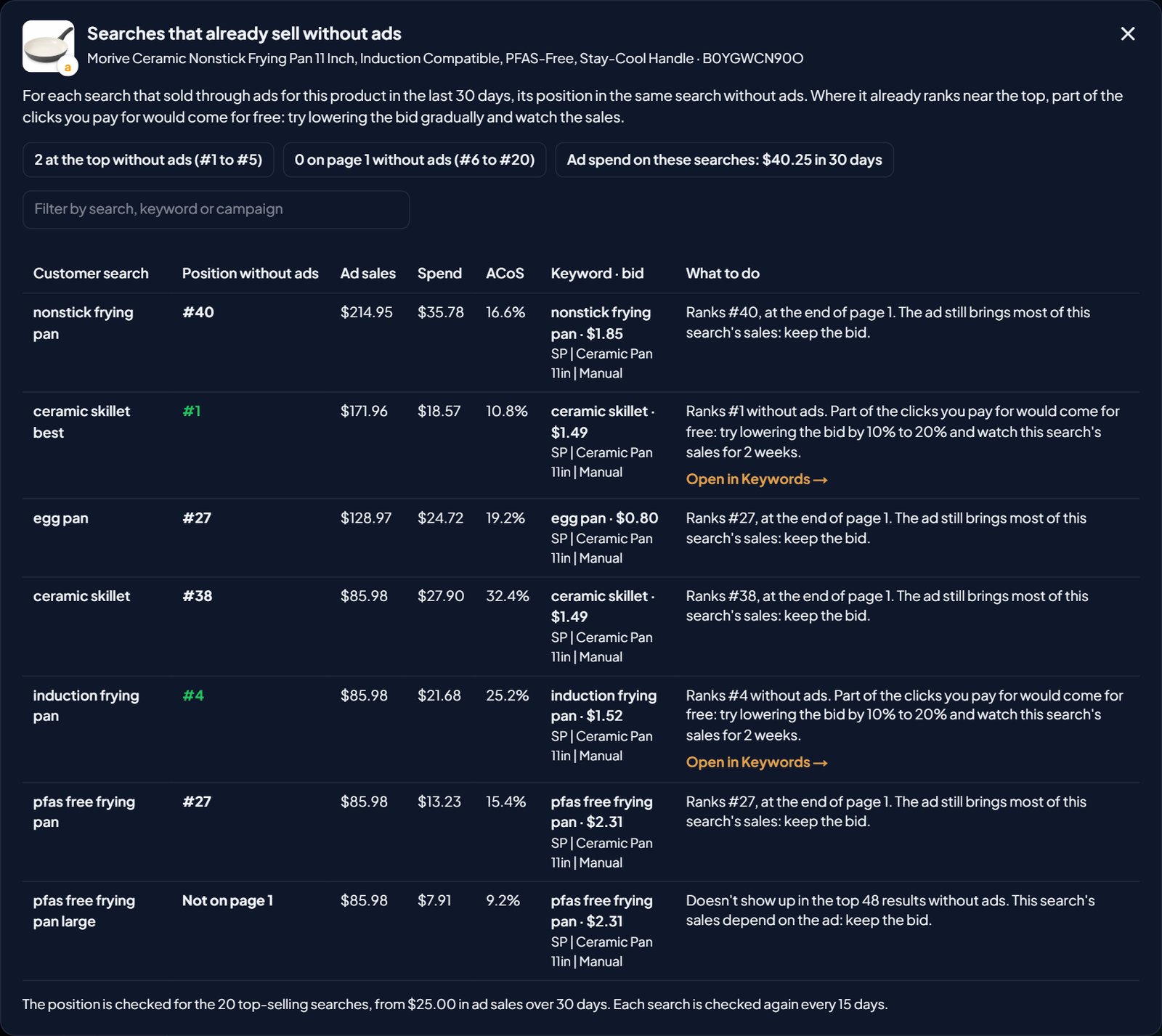
- The Searches that already sell without ads window opens. It always looks at the last 30 days, whatever period is chosen in the Dashboard.
The window only reads data. No bid changes on its own.
How to read the window
At the top come three summaries: how many searches have the product at the top without ads (#1 to #5), how many have it on page 1 without ads (#6 to #20) and the ad spend on these searches over 30 days, which is the budget where you can test a lower bid.
Then comes one row per search, from the one that sold the most through ads to the one that sold the least:
| Column | What it shows |
|---|---|
| Customer search | What the customer typed on Amazon that triggered your ad for this product. |
| Position without ads | Where the product shows up in this same search not counting ads, on Amazon's page 1. Green from #1 to #20. Hover to see the date the position was seen. |
| Ad sales | Sales attributed to the ad on this search in the last 30 days. |
| Spend | How much the ad spent on this search in the last 30 days. |
| ACoS | Spend divided by ad sales on this search. |
| Keyword · bid | The keyword or target of your ad that spent the most on this search, with the current bid and the campaign. |
| What to do | The bid suggestion based on the position. When there's no position, the reason shows here. |
The Filter by search, keyword or campaign field filters the list. You can also drag the columns to change their order.
What to do based on the position
| Position without ads | What the screen suggests |
|---|---|
| #1 to #5 | Part of the clicks you pay for would come for free. Try lowering the bid by 10% to 20% and watch this search's sales for 2 weeks. |
| #6 to #20 | Try a bid about 10% lower and see if sales hold. |
| After #20, still on page 1 | The ad still brings most of this search's sales: keep the bid. |
| Not on page 1 | This search's sales depend on the ad: keep the bid. |
In the first two ranges, the Open in Keywords → shortcut shows. It opens the Keywords screen already filtered by the product and the keyword, where you change the bid.
When you see "Sales and spend are for the whole ad group, which also has other products.", the ad group advertises more than one product and the search's numbers aren't only for this one. Keep that in mind before changing the bid.
Which searches are checked
- The position is checked for the product's 20 top-selling searches, from $25 in ad sales over 30 days on US accounts (other marketplaces have their own minimum). Smaller searches get no position, to avoid spending checks on small searches.
- Each search is checked again every 15 days. The first time, the window shows "Checking the position of N searches on Amazon…", which can take up to a minute.
- There's a limit of checks per month and per account. When it runs out, the window says so and keeps showing the searches already checked.
A search with no position shows "—" in the Position without ads column and the reason in What to do:
| Reason | What it means |
|---|---|
| Sold less than the minimum | The search sold less than $25 through ads in 30 days. |
| Left out of the 20 | Only the 20 top-selling searches are checked. |
| The check didn't finish | Close the window and open it again to continue. |
| Monthly or account limit | The checks ran out. Monthly ones come back at the monthly renewal; account ones come back gradually. |
| Check failed | Checking Amazon's search page failed just now. Open again in a few minutes. |
Three notices can show instead of the table: the product isn't in any Sponsored Products ad; no search sold through ads for this product in the last 30 days; or the account's ad search term report hasn't arrived from Amazon yet.
Example: the frying pan on the demo account
On the demo account (fictional product and brand), the 11-inch ceramic frying pan sold through ads on 7 searches in the last 30 days. Four of them:
| Customer search | Position without ads | Ad sales | Spend | Keyword · bid | What to do |
|---|---|---|---|---|---|
| ceramic skillet best | #1 | $171.96 | $18.57 | ceramic skillet · $1.49 | lower by 10% to 20% |
| induction frying pan | #4 | $85.98 | $21.68 | induction frying pan · $1.52 | lower by 10% to 20% |
| ceramic skillet | #38 | $85.98 | $27.90 | ceramic skillet · $1.49 | keep the bid |
| pfas free frying pan large | Not on page 1 | $85.98 | $7.91 | pfas free frying pan · $2.31 | keep the bid |
"induction frying pan": the product ranks #4 without ads, and its keyword only shows on this search. It's the clearest candidate. A bid 10% to 20% lower goes from $1.52 to somewhere between $1.22 and $1.37.
"ceramic skillet best": #1 without ads, so the suggestion is to lower by 10% to 20%. But look at the Keyword · bid column: the same keyword, with the same bid and the same campaign, also shows on the search "ceramic skillet", where the product ranks #38 and the suggestion is to keep the bid. The bid belongs to the keyword, not the search: lowering it affects both. In that case, lower it a little and watch both searches, or start with another one.
On the searches where the product ranks from #27 to #40, at the end of page 1, or doesn't show on page 1, the ad brings most of the sales, and the suggestion is to keep the bid.
How to test a lower bid
- One search at a time. Start with the one where the product ranks best and spend is highest, and check that the keyword doesn't also trigger searches where the suggestion is to keep the bid.
- Lower a little. 10% to 20% from #1 to #5; about 10% from #6 to #20.
- Wait and compare. After 2 weeks, open the window again: it shows each search's ad sales and spend for the last 30 days.
- If the search's sales drop, roll the bid back. The position without ads changes over time, which is why it's checked again every 15 days.
To change bids safely, see also Max profitable bid and high-ACoS safeguards. To know whether the product's ads are profitable, see the Break-even ACoS column in Break-even ACoS and From Ads by product.
