
Who touched the campaign?
A campaign's budget changed and nobody remembers changing it. A campaign that sold well woke up paused. In an account where the owner, the agency, an employee and Amazon's own automated rules all work, finding where a change came from usually takes time.
What changes through EcomVision is already logged in the other Change log tabs. What changes outside it isn't: the Amazon Ads console, another tool or an Amazon rule. The Outside EcomVision tab reads the change history Amazon keeps for each campaign and shows it all in one list, with the probable source of each change.
Where it is
- In the menu, open System › Change log.
- Click the Outside EcomVision tab, between Ads actions and Rule runs.
- Pick the 7, 30 or 90 days window. Amazon keeps at most 90 days of history.
The tab covers Sponsored Products and Sponsored Brands campaigns. Sponsored Display isn't included, because Amazon doesn't return its history. The history is read once a day, and the top of the tab shows when it was last read. On a newly connected account, the first read happens the following night.
What the list shows
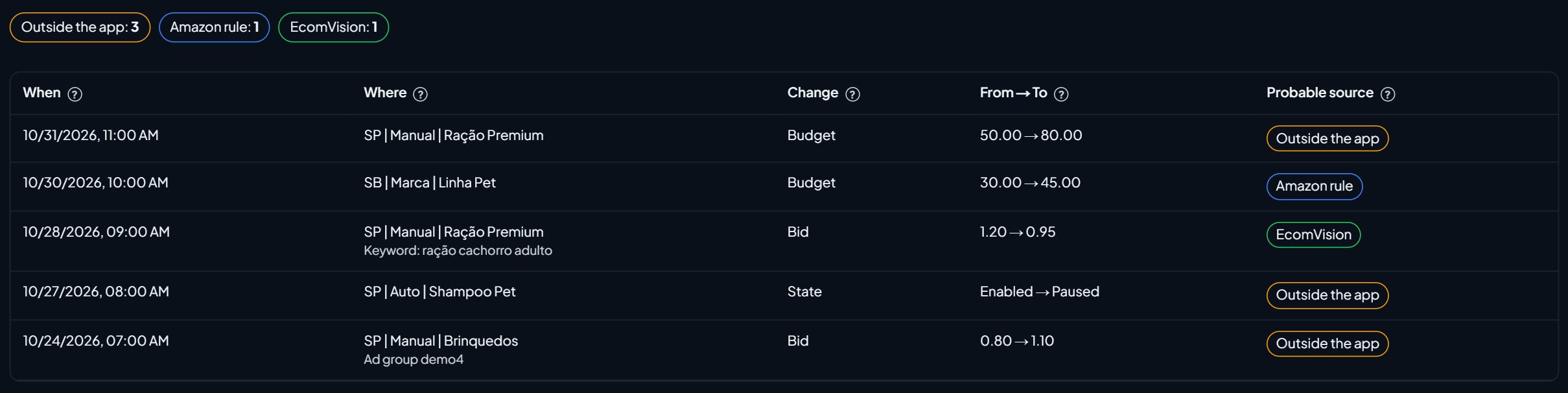
Above the list are the counters by source (Outside the app, Amazon rule and EcomVision). Each row is a change:
| Column | What it shows |
|---|---|
| When | The date and time of the change on Amazon. |
| Where | The campaign and, when applicable, the ad group, keyword or target that changed. |
| Change | What changed: budget, state, bid, placement or bidding strategy. |
| From → To | The value before and after, as Amazon recorded it. For example, 50.00 → 80.00 for a budget, or Enabled → Paused for the state. |
| Probable source | Outside the app, Amazon rule or EcomVision. |
The search finds a campaign, keyword or type of change, and you can drag the columns to reorder them.
How the source is decided
Amazon doesn't say who made the change. So EcomVision infers the source by elimination, and it shows up as probable:
| Source | When it shows up |
|---|---|
| EcomVision | The change matches an action applied by the app, within 15 minutes. It is also in Ads actions, with Undo. |
| Amazon rule | The campaign has an active Amazon automated rule: a budget rule (SP and SB) or, for a bid change, a bid rule (SP). Or Amazon itself flagged the change as rule-based. |
| Outside the app | It doesn't match any EcomVision action or Amazon rule: it was done in the Amazon Ads console, by another tool or by another person. |
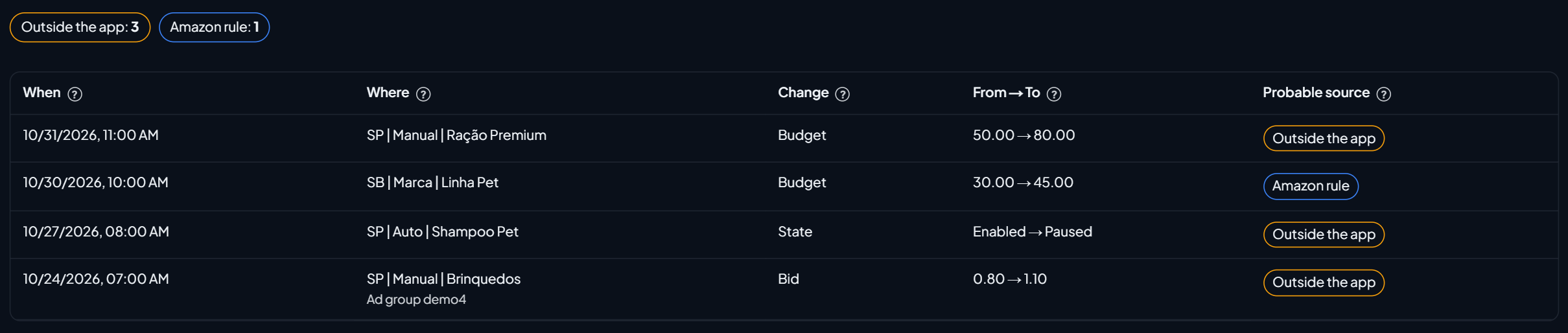
To see only what changed outside the app, uncheck Also show EcomVision changes. The actions made by the app stay in the Ads actions tab.
Example: the campaign that woke up paused
In the demo account (sample data), the automatic campaign "Shampoo Pet" went from Enabled → Paused on 10/27 at 08:00 AM, with source Outside the app. That means no EcomVision action and no Amazon rule explain the pause: someone paused it in the Amazon Ads console or with another tool. The next step is to ask whoever has access to the account, such as the agency or the team.
The "Linha Pet" budget, from 30.00 to 45.00 on 10/30, shows up as Amazon rule: the campaign has an active budget rule in the Amazon Ads console. If the budget shouldn't have gone up, that rule is what needs a review.
What to do with what shows up
- Outside the app: agree with the team and the agency on who changes what. If more than one tool adjusts bids or budgets, they can undo each other's work.
- Amazon rule: check the campaign's automated rules in the Amazon Ads console.
- EcomVision: see the details in Ads actions. If it was a mistake, use Undo.
- An ad stopped for no apparent reason: also check whether the product ran out of stock. EcomVision's Stock protection pauses the ads of out-of-stock products, and those pauses are in Ads actions.
To hide paused and archived campaigns in the campaign list, read Active Only Filter. And to understand which bid applies in each ad group, Ad group default bid.